
Download ACDSee Photo Studio Ultimate 2027 Full version for free (permanent). This program is for viewing, selecting, categorizing, and editing RAW images. It features layers, masks, and AI tools to help find similar images, fill in blanks, or remove objects. This is the latest version.
What is ACDSee Photo Studio Ultimate?
ACDSee Photo Studio Ultimate It's a program that takes us from a large pile of photographs to a single library where we can search and edit them. The Manage mode allows you to browse files from folders, enter keywords, ratings, colors, categories, and image descriptions, then search or filter by name, camera, lens, date, or custom criteria. This makes it easy to select and retrieve RAW and JPG files from a series of shots without having to move all the files to another system first.
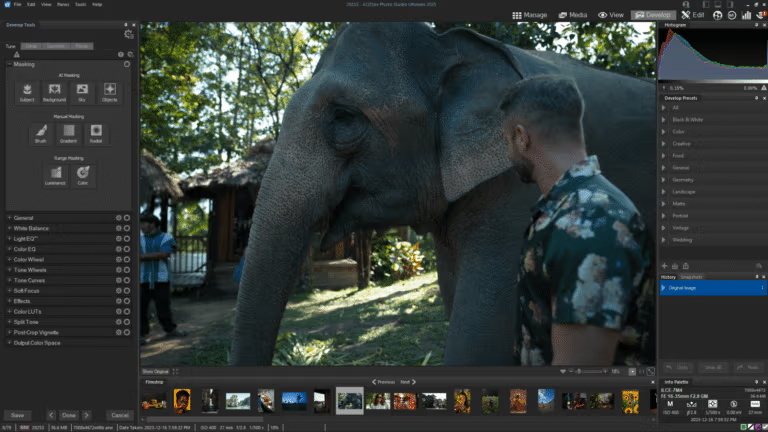
If an image requires both tone adjustment and selective retouching, Develop mode allows non-destructive RAW editing while preserving the original and saving presets for reuse. Edit mode opens the work as a layer, with masks, blend modes, text, shapes, and object selection tools for combining elements or further refining details. This is suitable if the work focuses on managing the image library and editing RAW files without needing to work with layers. ACDSee Pro 2026 It's a comparable model in the same family, with the Ultimate version adding layered editing tools to the same workflow.
This version adds several image selection tools. Auto-Stack combines images taken in chronological order, location, or similarity. AI Reverse Image Search finds similar frames from sample images, and Reject Tag makes it easier to mark images that shouldn't be saved before filtering. For image editing, there's Generative AI for creating images from text or reference images, filling in blank spaces, removing objects, and correcting images based on descriptions. AI Face Edit adds improved facial and hair detail adjustments.
Key Features
- Manage your image library in Manage.Browse images from folders, enter keywords, ratings, categories, and color labels, and then search using the image descriptions.
- Non-destructive RAW editing.Adjust brightness, color, details, and save Develop Presets while retaining the original data for future restoration or further adjustments.
- Layered EditingOverlay images and text. Use masks, blend modes, shapes, and object selection tools to assemble your work or retouch specific areas.
- AI Image GenerationCreate images from text, choose a pre-designed visual style, or reference an image to define characters, style, and elements.
- Generative EditExplain what you want to change with text, or use reference images to help define the result in the layer worksheet.
- Generative FillFill in any empty or missing areas in an image to blend seamlessly with the surrounding elements.
- AI RemoveRemove any objects or distractions in the image, and then have the system fill the background in that area.
- Auto-Stack and Custom StackingOrganize images into series based on time of shooting, GPS coordinates, or similarity, or choose your own grouping for continuous image comparison.
- AI Reverse Image SearchUse the selected image to search for other images with a similar overall appearance, without having to remember file names or enter keywords.
- Group By AI Image SimilarityGrouping similar images from a large library helps to quickly check image sets and duplicates.
- Reject TagMark the unwanted images and filter them out during batch screening.
- AI Face EditAdjust details of eyes, eyebrows, skin, shadows, lips, and hair for portrait photography.
- Supports additional RAW camera files.Open files from Canon EOS R6 V, Leica SL3-P, Panasonic LUMIX DC-L10/DC-ZS300, Sony a7R VI, and Cyber-shot RX10 V.
- Supports JPEG XL in DNG format.Handles DNG files using JPEG XL compression while maintaining image quality and reducing file size.
- Exporting images is now easier.Skip unnecessary settings windows and update the export preset defaults during runtime.
What's new?
ACDSee Photo Studio Ultimate 2027 upgrades image creation, selection, and library grouping. It adds Generative AI tools and uses image similarity to help find files that you recognize by appearance but can't remember the name of. It also improves the seamless editing of RAW files and portraits.
- Generative AI tools cover text-to-image creation, image correction based on commands or reference images, filling blank spaces, and removing unwanted objects.
- Auto-Stack groups images based on GPS coordinates, time, and similarity according to selected criteria, while Custom Stacking allows you to create your own image groups.
- The AI Image Similarity system indexes background images for grouping using Group By and uses AI Reverse Image Search to find images that resemble the sample image.
- Reject Tag adds a way to mark unwanted images for filtering out of a batch during large-scale image screening.
- AI Face Edit adds detailed control over eyes, eyebrows, skin, shadows, and lips, along with AI-powered hair adjustment tools.
- Added RAW support for Canon EOS R6 V, Leica SL3-P, Panasonic LUMIX DC-L10 and DC-ZS300, Sony a7R VI and Cyber-shot RX10 V.
- Supports JPEG XL within DNG files, provides improved image export shortcuts, and allows for easier changing of default export presets.
System Requirements
- Operating system: Windows 10 (64-bit) or Windows 11
- Processor: 64-bit Intel or AMD; Intel Core i5 or higher recommended.
- Memory: 8 GB RAM (16 GB or more recommended)
- Graphics card: Supports DirectX 12 feature level 12_0 or higher, 2 GB VRAM (4 GB recommended); 1920 × 1080 resolution or higher is recommended.
- Free space: At least 5 GB
- Additional requirements: Microsoft Edge, DirectX 12, Windows Media Player 9.0, and Microsoft Office 2010 or later; an email address and internet connection are required for activation, verification, and use of online services.
File Information
- Operating System: Windows 11 / 10 (x64)
- Risk Level: 🟢 Safe
- Developer: ACD Systems
- License: Full
- Language: English
- Size: 778.17 MB
- File type: *.rar
- Updated: 23/9/2026
- Required Reading: Download Guide