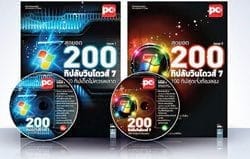
Top 200 secret Windows 7 tips. How much do you know? If you're not sure, go ahead and check them out!
Today I have a compilation of 200 amazing Windows 7 tips to share. I didn't write this myself; I found it somewhere. The content is quite interesting, covering various techniques to make Windows 7 faster, more powerful, and tailored to your needs. There are 200 tips in total, categorized as follows:
Issue 1: Top Windows 7 Tips and Tricks – 100 Must-Have Tips
1. How to capture an image from Media Center?
2. Turn off the Live Preview feature.
3. Commands to enable/disable Administrator Account.
4. Improve startup efficiency by enabling Boot-Only Fetching.
5. Fix issues when thumbnails are not displaying correctly.
6. Speed up Live Preview.
7. Let's speed up IE8.
8. Customize the function of the power button to your liking.
9. Please bring back the Quick Launch Bar.
10. Create a Flip 3D shortcut.
11. Access the icon repository.
12. Search for online radio stations (Internet Radio).
13. Add a numeric keypad to the on-screen keyboard.
14. Speed up Aero Peek's desktop display.
15. How to set Windows Media Center to start from scratch.
16. Resolve the issue of being unable to delete files in the Recycle Bin.
17. Please restore Windows Live Messenger to its original location.
18. Bring the Control Panel to the Taskbar.
19. Format the text in Sticky Notes.
20. Why don't I see Aero Peek working when I scroll to Show Desktop?
21. Schedule Windows Media Center to tune itself.
22. Fix the problem of the 7-Eleven app booting up repeatedly.
23. Copy your Favorites and save them as shortcuts.
24. Store the battery test results in HTML format.
25. Turn off automatic Desktop Showing.
26. Create a Recycle Bin shortcut and place it on the taskbar.
27. Install the Telnet Client.
28. Add your favorite websites to the right-click menu.
29. Delete the print queue.
30. Creating a slideshow background is super easy.
31. Open and use the same application simultaneously.
32. Adjust the settings to read text files in Thai.
33. Enable automatic login.
34. Restore the Control Panel icon display to its original state.
35. Pin your favorite programs.
36. Send your favorite folder to Favorites.
37. Take a screenshot with PSR.
38. Make the icons in the taskbar display as text again.
39. Open a folder and work with a different process.
40. Instruct the program to run under a different username.
41. Close the Windows Live Mail splash screen.
42. Interrupt the restart after the file update is complete.
43. Run the Computer Management program quickly.
44. Disable Hibernate Mode.
45. Reveal the audio recording source from the sound card.
46. Search for image files by typing "Pictures" only.
47. Prevent the mouse from waking the PC.
48. Use IE's InPrivate feature from the Jumplist.
49. I want to turn off AutoPlay.
50. Add the "TakeOwnerShip" command to the right-click menu.
And many more!
Issue 2: Ultimate Windows 7 Tips – 100 Awesome Tips You Must Try
101. Adjust the display settings in conjunction with the projector.
102. Pin your favorite folders easily.
103. Optimize the display.
104. Convert various units of measurement instantly.
105. Increase logon speed.
106. Delete the Sticky Notes history files.
107. Logging in to multiple accounts from IE.
108. Access all commands related to energy management.
109. You can open Command Prompt from any folder.
110. Create a keyboard shortcut to launch the program.
111. You can also find the Jump List by left-clicking.
112. Make the Start Search box search the internet.
113. Install a Thai keyboard quickly by simply selecting Thai as your System Locale.
114. Use the search bar to copy files located within subfolders.
115. Troubleshooting a broken right-click button.
116. Type the command to manage Bluetooth devices.
117. Use the Group sorting option to count the number of files.
118. Shutdown is faster.
119. Lock your screen with one click.
120. I'd like to know which search providers are installed on your computer.
121. Commands to manage devices that trigger Wakeup.
122. Fix when the Taskbar doesn't appear.
123. Disable ALPM to resolve the DVD drive issue.
124. Update the Windows Experience Index value.
125. Create a Show Desktop icon.
126. To select a large number of files, please use the Check Box feature.
127. Change wallpaper using RSS Feed.
128. Enable the hidden theme.
129. Install new fonts instantly.
130. Remove the program from the display list.
131. Quickly arrange windows on your desktop.
132. Shortcut from the toolbar to access the desktop.
133. Use Disk Cleanup to view junk files.
134. Create a shortcut to open the Command Prompt in Admin mode.
135. Create a Startup Message that resonates with the audience.
136. How to turn Secure Logon on/off.
137. I want to change the icon that indicates the file type.
138. Track down the days the 7-Eleven store is being installed.
139. Automatically log in to all Microsoft online services.
140. Resolve the issue of being unable to adjust UAC.
141. Check computer specs with 7-Eleven.
142. Add a very simple option to SendTo.
143. Startup Message without modifying the registry.
144. Show all commands in the Control Panel.
145. Prevent the hard disk from entering Turn Off mode.
146. Delete the Prefetch Cache to increase speed.
147. Reduce shutdown time.
148. Lock the background image to prevent anyone from changing it.
149. I don't want image files to be previewed.
150. I want to use the command prompt in full-screen mode permanently.
And many more!