
Download TablePlus 27 full version, a GUI database management program for MySQL, PostgreSQL, SQLite, SQL Server, and MariaDB. It features an SQL Editor, Safe Mode, SSH/TLS, Inline Edit, and multiple tabs within a single interface.
What is TablePlus?
TablePlus คือโปรแกรมสำหรับจัดการฐานข้อมูลบนคอมพิวเตอร์ ที่ออกแบบมาให้การทำงานกับข้อมูลเป็นเรื่องง่ายและรวดเร็ว แทนที่จะต้องพิมพ์คำสั่งทุกอย่างผ่านหน้าจอสีดำ โปรแกรมนี้เปิดหน้าต่างที่ดูสะอาดตา ช่วยให้มองเห็นโครงสร้างของฐานข้อมูลทั้งหมดได้ในที่เดียว ทั้งรายชื่อตาราง ชื่อคอลัมน์ และข้อมูลที่เก็บอยู่ข้างใน ทำให้คนที่ทำงานกับข้อมูลทุกวันสามารถตรวจสอบ แก้ไข และค้นหาสิ่งที่ต้องการได้โดยไม่ต้องจำคำสั่งที่ซับซ้อน
โปรแกรมรองรับฐานข้อมูลยอดนิยมหลายชนิดในตัวเดียว ทั้ง MySQL, MariaDB, PostgreSQL, SQLite, Microsoft SQL Server และ Redis จึงไม่ต้องติดตั้งโปรแกรมแยกกันสำหรับฐานข้อมูลแต่ละแบบ เพียงแค่เพิ่มการเชื่อมต่อเข้าไป แล้วสลับไปมาระหว่างฐานข้อมูลต่าง ๆ ได้จากแถบด้านข้างอย่างรวดเร็ว จึงเหมาะกับคนที่ดูแลหลายฐานข้อมูลพร้อมกัน
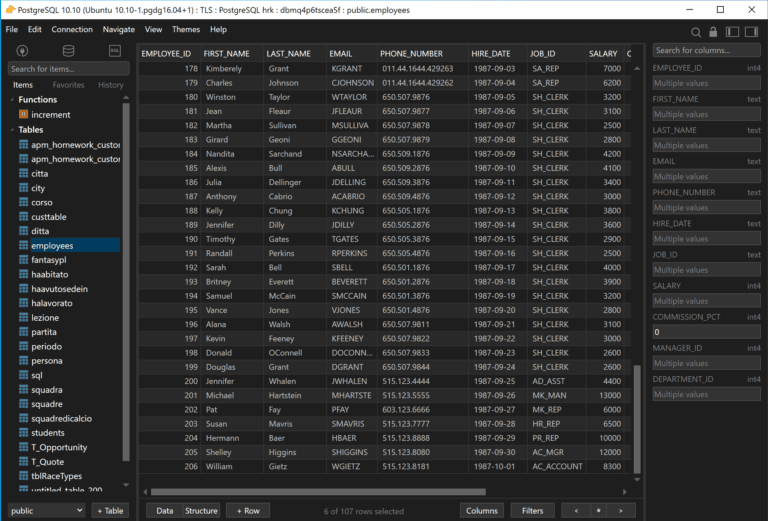
ในชีวิตประจำวัน TablePlus ช่วยให้การดูและจัดการข้อมูลสะดวกขึ้นมาก สามารถเปิดตารางขึ้นมาเลื่อนดูข้อมูล แก้ไขค่าตรงช่องที่ต้องการ เพิ่มแถวใหม่ หรือลบแถวที่ไม่ต้องการได้ทันทีโดยไม่ต้องเขียนคำสั่งเอง นอกจากนี้ยังมีเครื่องมือค้นหาและกรองข้อมูลที่ช่วยให้เจอแถวที่ต้องการได้เร็ว แม้ตารางนั้นจะมีข้อมูลหลายหมื่นแถวก็ตาม และเมื่อต้องการดูภาพรวม ก็สามารถเรียงลำดับตามคอลัมน์ที่สนใจได้ตามต้องการ
สำหรับคนที่ถนัดการเขียนคำสั่ง SQL โปรแกรมก็มีตัวแก้ไขคำสั่งที่ช่วยอำนวยความสะดวกไม่น้อย เพราะมีการเน้นสีตามไวยากรณ์ของภาษา แนะนำชื่อตารางและชื่อคอลัมน์ขณะพิมพ์ และเก็บประวัติคำสั่งที่เคยใช้ไว้ให้กลับมาเปิดดูได้ภายหลัง ช่วยให้เขียนคำสั่งที่ซับซ้อน เช่น การเชื่อมตารางหลายตารางเข้าด้วยกัน ได้อย่างมั่นใจมากขึ้น และยังตรวจสอบผลลัพธ์ได้ทันทีในหน้าต่างเดียวกัน
Another reason for TablePlus's popularity is its lightweight and speed. It boots up quickly, runs smoothly even on less powerful machines, and features an error prevention mode that warns you before saving important changes, reducing the chance of accidentally deleting sensitive data. Furthermore, it supports importing data from files such as CSV and exporting data to various formats for easy use or sharing with colleagues. This makes it ideal for developers, data analysts, and system administrators who frequently work with databases.
Key Features
- Supports MySQL, PostgreSQL, SQLite, Microsoft SQL Server, MariaDB, Redshift, Oracle, and many other databases.
- A data grid is a table-like structure that allows you to view, edit, add, and delete data inline.
- The SQL Query Editor features syntax highlighting and auto-completion while typing.
- You can open the Query Editor in multiple tabs and separate multiple sets of results into different tabs.
- Query History and Favorites help you save frequently used commands for quick access.
- Advanced Filters allows you to filter data based on multiple conditions from a table without having to write a query every time.
- Preview SQL displays the commands generated by the GUI before committing changes to the server.
- Safe Mode has several levels for warning or requesting a password before submitting queries that may modify data.
- Built-in SSH and TLS support for connections that require tunneling or encryption.
- Multiple tabs, Windows, and Workspaces help you work with multiple connections simultaneously.
- Importing, exporting, and modifying table structures can be done through the GUI without having to write SQL for every step.
- Open Anything. กระโดดไปยังตาราง สคีมา ฐานข้อมูล วิว หรือฟังก์ชันที่ต้องการได้ทันทีจากจุดเดียว
- Metrics Board. สร้างแดชบอร์ดภายในจากข้อมูลในฐานข้อมูลได้รวดเร็วและง่ายดาย
- SQL Editor แยกหน้าต่างผลลัพธ์ จัดรูปแบบคำสั่งใหม่ และสตรีมผลลัพธ์ทีละแถวขณะ Query กำลังรัน
- Works in the same field as Navicat Premium But it uses the native workflow and interface of TablePlus.
What's new?
เวอร์ชัน 27.2 – 28 October 2026
- Add Schedule Tasks ใหม่ สำหรับตั้งเวลางานให้ทำงานตามเวลาที่กำหนด
- Add Sync Database ใหม่ มาแทน Backup and Restore เดิม ใช้ซิงค์ฐานข้อมูลให้ตรงกันได้สะดวกขึ้น
- Press Ctrl + L เพื่อกระโดดไปยังคอลัมน์ที่ต้องการได้ทันทีโดยไม่ต้องเลื่อนหาเอง
- Fixed various errors found in the previous version.
File Information
- Operating System: Windows 11 / 10 / 8.1 / 7
- License: Freemium
- Developer: TablePlus
- Language: English
- ขนาด : 127.15 MB
- File type: *.rar
- Password: mawto
- Installation Method: Available
- ปรับปรุงเมื่อ : 1/11/2026
- Required Reading: Download Guide