Download Steinberg VST Live Pro 3 (x64) permanent free, a live show control system for musicians and stage crews combining audio, lighting, video, and streaming in a single program, single file, latest version with installation guide.
Overview of Steinberg VST Live Pro
Steinberg VST Live Pro is a specialized stage live performance control program developed by Steinberg, the same company behind Cubase designed to be the center of the entire show, whether it is music, lighting, video, and live streaming, instead of having to open multiple programs at once and manually coordinate everything. You can prepare every element of the show in a single project and let the program play everything simultaneously and on beat, from the first song to the last song of the setlist, making it suitable for solo artists on small stages to full bands and large stage performances.
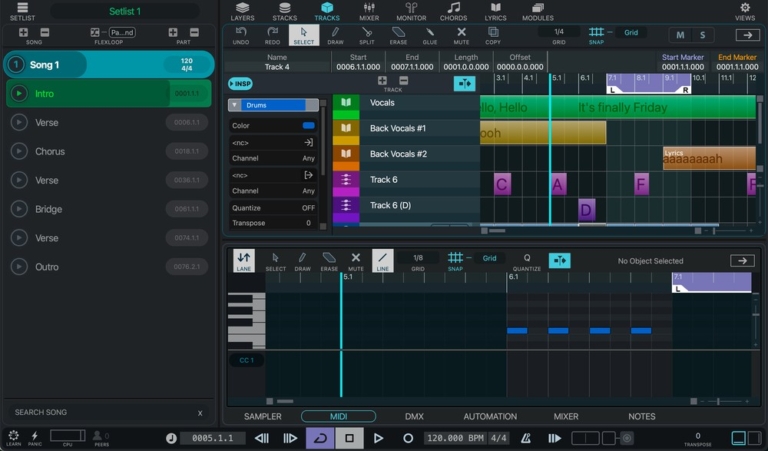
The core of operation relies on organizing songs into Songs and Parts by creating a setlist for the entire show first, then defining what sounds, backing tracks, click tracks, lyrics, chords, and patch change cues are used in each song. The program supports audio tracks, MIDI tracks, and video tracks, allowing you to open pre-prepared audio files, play virtual instruments via VST plugins, and automatically switch sounds or effects according to the song parts. Changing songs or sections is seamless with no gaps, reverb tails do not cut off, and the tempo does not stutter.
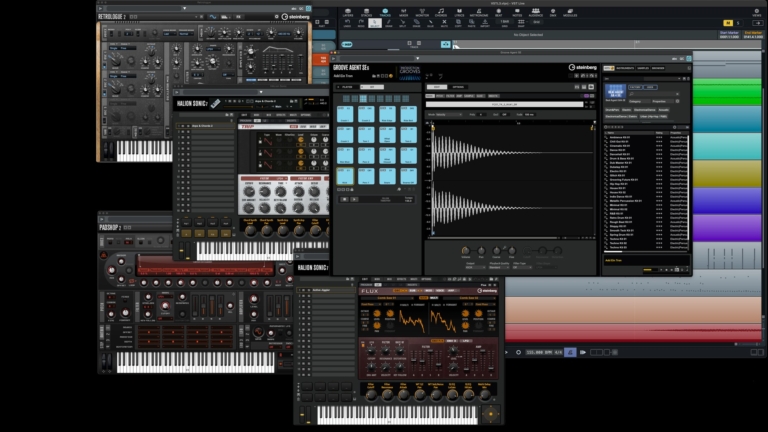
The live sound section operates through the Layers and Stacks panels, allowing virtual instruments to be loaded and played instantly with a keyboard or MIDI controller, complete with HALion Sonic SE and Groove Agent SE for drums. Singers and guitarists can create their own effect signal chains in Stacks and adjust sounds during performance from the built-in mixer. The program also features a separate monitor mixer for each band member to listen to their own sound in in-ear monitors as needed, and records all performances as multi-tracks simultaneously for later mixing.
What sets VST Live Pro apart from standard music production software is the simultaneous control of visuals and lighting along with audio. The program controls stage lighting directly via DMX signals and includes a video track to play accompanying visuals matching the song. The Video Director helps switch feeds from multiple cameras along a set timeline and connects with OBS Studio for live streaming. Every musician on stage can also view lyrics, chords, and count-ins via the VST Live Mods app on their own mobile devices or tablets over a wireless network, keeping everyone in sync without having to look at the same screen.
Features of Steinberg VST Live Pro
Video and Live Streaming
- Video Director. Manage live video streams from multiple sources, switch cameras, and control video playback in real-time.
- Record video from all connected inputs and arrange or mix video sources in the project as needed.
- Stream video and audio directly into OBS without relying on external hardware, with easy setup and routing.
- Automated tracks for video, setting up camera switching cues and playback in advance according to the song's tempo.
Audio and Monitor Mix
- Monitor Mixer. Create separate monitor mixes using individual channel Sends, ideal for on-stage in-ear monitors.
- Shared input modules and channels in the mixer, enabling faster mixing and workflow.
- Flux And Trip Built-in virtual synthesizer with Groove Agent SE for drum and percussion sounds
- Supports playing backing tracks, virtual instruments, mixing, and automation all in one place.
Lights, lyrics, and chords.
- DMX Right in the mixer—control brightness, mute, and solo stage lights directly from dedicated faders.
- Unlimited chord and lyric tracks, offering flexibility for both arrangement and show control.
- Display lyrics across multiple screens simultaneously so each band member sees only their own part.
Usage
- In-App Help. Open documents and feature descriptions directly within the program without needing to switch out to search externally.
- Multi-language support, usable with international crews.
What's new
Version 3.0.60 – September 2026
- Actions. Added a Modules view with an End Marker for managing song parts.
- Hub. Developer update highlights when the news tab has new information.
- Layers. Redesigned the input selection menu for easier use.
- Mixer And Monitor. Added Send types to choose from: Pre-Insert, Pre-Fader, or Post-Fader.
- Plug-Ins. Supports MIDI-Out for virtual instruments.
- Transport. Added a Time Domain selection menu.
- Fixed an issue where project loading and setlist menus did not update according to older projects.
- Fixed audio dropouts when switching songs and MIDI timing drift when connecting MIDI tracks.
- Improved MIDI file import for both tempo events and time signatures.
- Improved DMX engine, Transport fonts, and plugin responsiveness.
System Requirements
- Operating System: Windows 10 / 11 (64-bit, version 21H2 or higher)
- Processor: Intel Core i5 or higher, or AMD Ryzen
- Memory : 8 GB
- Available space : 20 GB
- Additional : Internet access is required for installation and activation
file information
- Operating System: Windows 10 / 11 (64-bit)
- License : Full
- Developer: Steinberg Media Technologies GmbH
- Language: Multilingual
- Size : 481.52 MB
- File type: *rar
- Password : mawto
- Installation method: Yes
- Updated on: 12/11/2026
- Need to read: Download Guide