Download the Orpheon app, a free music player for Android that plays local files, live radio, and music from manually installed addons. Listen without signing up for an account, featuring word-by-word synced lyrics and a 10-band equalizer.
What is Orpheon?
Orpheon is an Android music player app that plays local music files, online radio, and music from user-installed addons. This app is the new name for Myspoti chosen by the community. It operates primarily through addons and lets you start listening without creating an account, while offering much more detailed playback control.
The most obvious difference is the lyrics. The app displays word-by-word synced lyrics matching the rhythm of the playing song, along with translations. It also pulls song meanings from Genius to read alongside, helping you understand what foreign songs are about rather than just singing along.
On the audio side, Orpheon allows deeper customization than usual, featuring a 10-band equalizer to tune the sound to your headphones or speakers. You can adjust playback speed, skip silence between tracks, and view a technical info page showing the audio format and bitrate of the currently playing song.
Music management is fully featured, including queue organization by dragging to reorder, non-repeating shuffle until all tracks have played, repeat settings, crossfading between tracks, automatic mixing with AutoMix, and a sleep timer. It also includes a recap page that summarizes your most-played songs, artists, and albums for a look back.
Orpheon also supports offline listening via manually installed addons, features live radio from around the world, searches for music from open catalogs like Deezer, iTunes, and MusicBrainz, and is compatible with Android Auto, Android TV, and Wear OS watches. Frequent device switchers will find their music follows them everywhere without needing to start over.
Orpheon is free to download, but since it is not on the Play Store, you must download the installation file directly from the developer's page. Open the app and start listening immediately without signing up for an account. If you want a music player that can be customized to your liking and is not tied to any streaming service, Orpheon is the choice that gives you back control over your music listening.
Anyone who previously used Myspoti will find that Orpheon is simply the new name for the original app chosen by the community.
Features:
Listening to music
- Search for music from open catalogs. Search for songs, albums, and artists from Deezer, iTunes, and MusicBrainz, and arrange data sources to your liking in the settings.
- Customizable music queue. Drag and drop to reorder tracks in the queue, shuffle without repeating until all tracks have played, and set repeat modes for either the entire list or a single track.
- Crossfade and AutoMix. Transition smoothly between tracks or let AutoMix blend the next song in rhythm, complete with a sleep timer.
- 10-band equalizer. Adjust sound with ready-made presets, adjust playback speed, and skip silence between tracks.
- Technical details of the playing song. Stats for nerds shows the codec, sample rate, bit depth, bitrate, and output device of the currently playing song.
- Works with headphones and cars. Connects via Bluetooth with headphone names, controls from the lock screen, notifications, and widgets, with Android Auto support.
Lyrics
- Word-by-word synced lyrics. Display time-synced lyrics word-by-word or line-by-line with translations.
- Song meanings from Genius. Read the story behind the song and tap underlined lines to see explanations, also translated into our language.
Listen offline
- Listen offline via add-ons. Install download source add-ons to store songs, albums, and playlists locally. Downloaded files are encrypted and confined within the app.
- Play local music files. Open audio files stored on your phone directly.
Add-ons
- Add-ons operate in a sandbox. Scripts from third-party developers that we install can only do what they requested permission for during installation, and we can choose which ones to enable or disable.
- Audio sources and download sources from add-ons. Add-ons determine where music comes from and can also have their own settings in the settings page.
other
- Personal recap. Summarize your most-frequently listened songs, artists, and albums and store them locally on your device.
- Live radio. Listen to online radio from around the world, toggle it on or off in the settings, and save your favorite stations locally.
- Supports 69 languages. The app displays in the device's language or allows you to manually select a language.
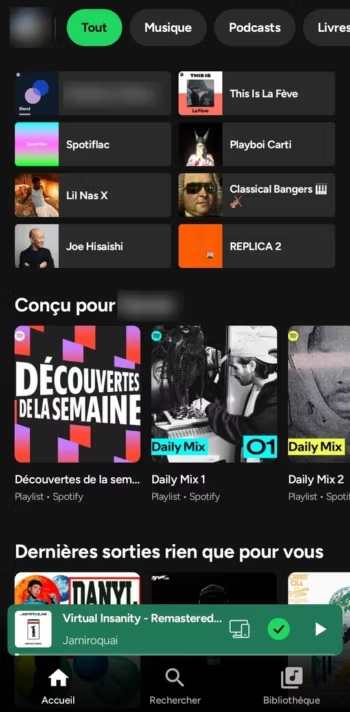
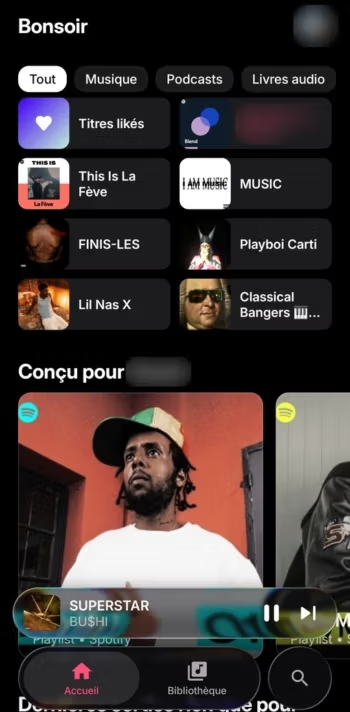
- Battery-saving and screen-friendly. Features a data-saving mode, battery saver, pure black theme for AMOLED screens, and customizable app accent colors.
What's new
Version 1.0.0
- The app has transitioned into a music player that primarily operates via extensions, playing local files, live music, and music from manually installed extensions, while songs, albums, and artists are searched from open catalogs like Deezer, iTunes, and MusicBrainz.
- Songs found on the search, album, or artist pages can be played directly from extension audio sources.
- An account is no longer required; upon first launch, you can choose whether to use a YouTube Music account or no account at all.
- Extensions can open lists from catalogs and support the myspoti-cli play command.
- The app does not host content and has no audio sources of its own; installed extensions depend on the installer's choice.
How to install Orpheon
- Download the .apk file from our link below (make sure the file size matches what is specified in this article).
- Install the downloaded .apk file as usual without needing to root your device.
- Open the app to use.

file information
- Operating system: Android 10+
- Developer: kota-zo
- Language: Multilingual
- Size: 54 MB
- File type: apk
- Version: 1.0.0
- Updated on : November 18, 2026
- Need to read: Download Guide
==== v1.0.0 (universal) ====
==== v1.0.0 (arm64-v8a) ====
==== v1.0.0 (armeabi-v7a) ====
==== v1.0.0 (TV) ====