

Many of you who regularly download files from One2up have likely encountered these issues: extremely slow download speeds, the file size not displaying, or the download not starting at all.
The fact that the file exhibits the aforementioned symptoms does not mean that the link is broken or the file is corrupted in any way. It simply indicates that the server hosting the link is experiencing heavy usage, is encountering issues at the moment, or the file may have just been uploaded and is still in the process of becoming available for download. This is a common occurrence, and newly uploaded files often require a short wait before they can be successfully downloaded.
The solution is very simple: just change the server number to another number between 1 and 19. Keep changing it until it's as fast as you want or until the file size appears.
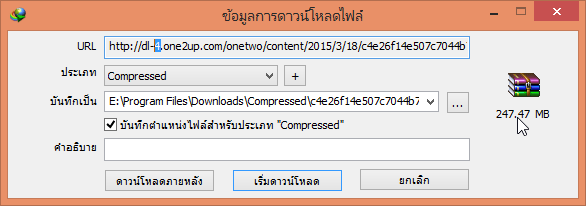
Example of solving the one2up slow loading or unable to load (file size not displayed) issue when downloading from IDM

If the file size doesn't match the one in the image, just copy the link from the URL field.
– Once done, proceed to change the server number, which is currently linked to 19 (specifically dl-19), to a different number.
– We can change it to any other number from 1 to 19.
After the change, we will be able to load as usual.
Here are some small tips for you^^ (แมวโตะ)