Download CyberLink AudioDirector Ultra 2027 v17.0.6707.0 Full, free, and permanently. This high-quality audio editing, cutting, and soundtrack creation software features AI noise removal and advanced AI tools. It's the latest version.
What is CyberLink AudioDirector?
CyberLink AudioDirector AudioDirector is a professional audio editing and production software developed by CyberLink, a Taiwanese software company known for PowerDirector in the video editing world. AudioDirector is designed to cover all types of audio work in a single program, from recording, editing, restoring damaged audio, and multi-track mixing to producing content for podcasts, YouTube, and post-production. It's used by content creators, video editors, and podcasters who want clean, studio-quality audio without relying on multiple software programs.
A key feature that has made AudioDirector popular among content creators is its most comprehensive AI audio recovery tools on the market. These include AI Noise Reduction to remove background noise, AI Wind Removal to eliminate wind noise during outdoor shooting, AI Spectral Recovery to remove artifacts at various frequencies, DeReverb to reduce reverberation, and Plosive/De-essing for cleaner speech. All of these are easily accessible via the AI Restoration Assistant, which analyzes problems in audio files and automatically recommends the appropriate tools, eliminating the need for manual testing.
AudioDirector also connects directly to PowerDirector. Users can export entire audio projects directly to PowerDirector for integration with video editing, with editing automatically syncing between the two programs. This is ideal for users who use both in the same workflow, and also allows for simultaneous video playback and audio editing, ensuring that the audio is always synchronized with the video.
Features:
Core Functions
- Multichannel audio recording: Record from multiple input devices simultaneously through a fully customizable Record Room, allowing you to adjust input device, volume level, channel, sample rate, and bit depth. Supports Punch & Roll for re-recording only the desired section without starting over.
- AI Restoration Assistant: It scans audio files and automatically recommends the appropriate recovery tool. Solve the problem with a single click; no need to try different tools manually.
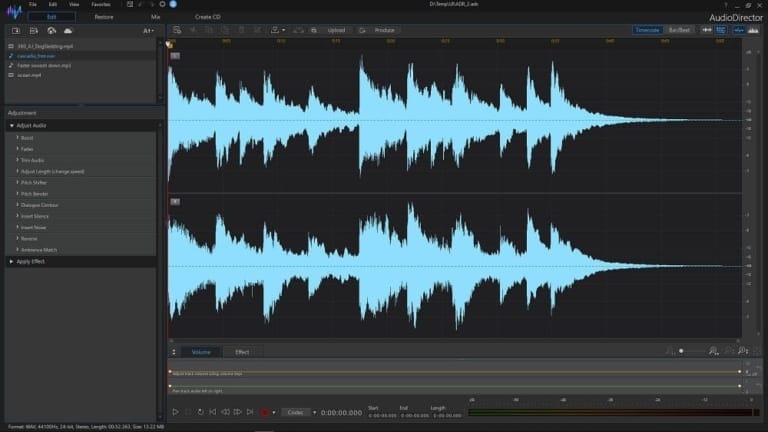
- Multitrack mixing with real-time preview: Work with multiple tracks on the same timeline, adjust volume, add effects, and preview the results in real-time without rendering first.
- Spectral Editor: Visualize and correct audio problems at different frequency levels through the Spectrogram view, accurately removing unwanted noise without affecting other audio components.
- Batch Processing: Apply effects and presets to multiple audio files simultaneously. Ideal for projects requiring consistency in sound across all files.
Special Features
- AI-powered complete audio recovery: AI Noise Reduction removes background noise, AI Wind Removal eliminates wind noise, DeReverb reduces reverberation, Clipping Removal corrects distortion, Hum Removal removes hum, Hiss Removal removes hiss, Plosive Removal corrects excessive "p" and "b" sounds, and De-essing reduces high-pitched "s" sounds.
- AI Speech Enhancement and Speech Isolation: Enhance speech clarity and separate speech from background noise with AI for podcasts, interviews, and narrations.
- Podcast Studio and Text-Based Editing: A podcast editing room where you can edit audio like you edit text. AI converts speech into transcript, allowing you to edit, delete, or move desired sections, as well as automatically remove silent and repeated phrases.
- AI Lyrics to Song: Type in your desired atmosphere, theme, or lyrics, and AI will create entirely new music and vocals in seconds for use as background music in videos or podcasts.
- Vocal Remover and Auto-Fit Background Music: Separate vocals from music for karaoke or remixes, and automatically adjust the background music length to fit the video using AI analysis and remixing for a seamless finish.
- Surround Sound and Spatial Audio: Supports 7.1 Surround Sound and 360° Spatial Audio mixing for 360-degree video, including a Stereo Expander to enhance sound width and depth.
System Requirements
- Operating System: Microsoft Windows 11 and 10 (64-bit OS only).
- Processor (CPU): Intel Core™ i-series (6th generation and above) or AMD Ryzen-series and above. AI features require an Intel Haswell (4th generation) Core i7-4770 or AMD Ryzen™ 3 1200 and above.
- Memory (RAM): 4 GB required, with 8 GB or above strongly recommended.
- Graphics Card (GPU): 128 MB VGA VRAM or higher; AI features require 2 GB VGA VRAM or higher.
- Screen Resolution: 1024 x 768, 16-bit color or higher.
- Internet Connection: Required for initial software, file format activation, and downloading AI components.
File Information
- Operating System: Windows 7 / 8.1 / Windows 10 / Windows 11 (x64)
- Risk Level: 🟢 Safe
- Developer: CyberLink
- Language: English
- Size: 139 MB
- File type: *.rar
- Password: mawto
- Installation Method: Available
- Updated: 25/7/2026
- Required Reading: Download Guide
You can still download CyberLink AudioDirector 2026 Free
==== Download AudioDirector 2026 ====