
Download PhraseExpress 18 Full, the free, permanent version of this typing assistant and keyboard shortcut manager. It corrects spelling errors, automatically adds frequently used words, and allows for faster text completion. This is the latest version, complete with file information and installation instructions.
What is PhraseExpress?
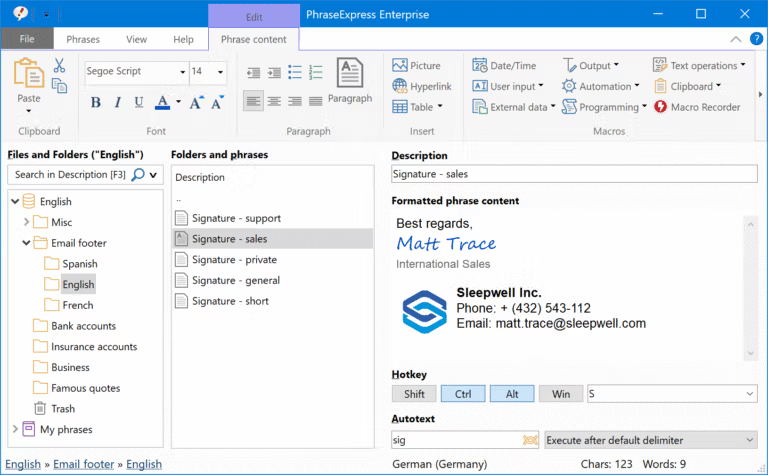
PhraseExpress This is a text library and text expander program designed to eliminate repetitive typing from daily life. Instead of typing the same email reply, company address, signature, or sentence dozens of times, we pre-set short abbreviations and let them automatically insert the full text into any document, email, chat, or input field the moment the abbreviation is pressed. The result is significantly increased speed, fewer errors, and consistent formatting of everyday text without relying on memorization.
At the heart of this tool is the autotext mechanism, which instantly transforms short words into long sentences. It works with any app on the device, not just office work. The auto-complete function observes frequently entered words and suggests completing sentences automatically. Additionally, there's a clipboard manager that stores a history of copied content for later retrieval, macro functions for inserting dates or performing calculations mid-sentence, and a form-filling assistant that fills in specified fields with a single click. What makes later versions even more outstanding is the integration of AI. We can instantly summarize or rewrite phrases in a formal or informal tone, supporting multiple language models including OpenAI, Claude, Deepseek, Gemini, and even models running locally on the device.
This tool is ideal for tasks that require repetitive customer responses, such as customer service, sales, office work, hospitals, and law firms, as it reduces both time and errors from manual data entry. Teamwork is possible through a shared central database on a network or the cloud. You can define which phrases are private and who can see them, and it supports SQL Server databases for large organizations. All data is stored locally, eliminating the need to export it, and it supports AES encryption. A portable version runs from a USB drive without installation and supports Windows, Mac, and iPhone/iPad, with easy cross-device database syncing. If you want to compare it to other typing assistance tools... FastKeys Pro It's also an alternative that emphasizes hotkeys, text expanders, and automation.
Features:
- Universal Autotext. Pressing a short abbreviation instantly expands it into a longer sentence. This works with all apps on your device, not just office work.
- You can instantly instruct the AI to summarize or rewrite phrases in a polite or informal tone. It supports hundreds of language models, including OpenAI, Claude, Deepseek, Gemini, Perplexity, and even locally run models.
- Macro Recorder. Record repetitive work processes and play them back like a tape recorder, eliminating tedious tasks from the workday.
- Document Generator. Choose your desired template and assemble your entire document in just a few clicks. Lawyers can use it for drafting contracts, writers for creating manuals, and doctors for writing individual reports. (Microsoft Word must be installed on your computer.)
- The form automatically collects input from your own data and inserts it into a template, eliminating the need to edit each element individually.
- You can pull data from external sources and insert it into phrases, creating templates that change content based on actual data.
- Email Signature Manager. Manage email signature templates from a single location. Compatible with all email programs, including Outlook and Thunderbird.
- The Outlook plugin automatically inserts a greeting and suggests a reply template based on the context of that email.
- Share a phrase with your team. A centralized repository on the network or cloud allows you to define which phrases are private and which are publicly visible. Supports SQL Server and Citrix/TerminalServer. Prevents edit conflicts.
- You can synchronize phrases via Dropbox, OneDrive, Google Drive, OwnCloud, Synology, or shared folders on your NAS.
- This single phrasebook allows you to switch between multiple languages instantly, and you can translate phrases into other languages with a single click.
- Portable version. It can be run directly from a USB drive without installation and is fully functional.
- It's available for Windows, Mac, and as a free app for iPhone/iPad, with the ability to sync your library across devices.
- Privacy First. All data is stored locally; no external cloud is required. Key phrases are encrypted using AES, and a password can be set for protection.
- Save copied text to the clipboard, allowing you to retrieve and re-paste old text at any time.
What's new?
What's new in version 18.0.81?
- Added the GPT 6 AI model to the list of usable language models.
- Improve the display of text in the trash bin to make it easier to read.
- Add a language switching button to the filtered phrases menu.
- Resolve the issue of a stuck disabled state after data recovery.
- Fixes the issue of unnecessarily switching to the search list page after deleting an item.
File Information
- Operating System: Windows 11 / 10 / 8.1
- Risk Level: 🔴High Risk -> VirusTotal Report
- Developer: Bartels Media GmbH
- Languages: English, German
- Size: 126.48 MB
- File type: *rar
- Password: mawto
- Updated: 26/9/2026
- Required Reading: Download Guide
💡The patch file (v18) is set to run in a sandbox to reduce risk.
==== PhraseExpress 18 ====
==== PhraseExpress 17.0.135 ====