
Download Adobe InDesign 2027 full permanent version, professional print media design software for layout design of books, magazines, brochures, and all kinds of print works, featuring AI tools to work faster.
What is Adobe InDesign 2027?
Adobe InDesign 2027 is a print design and page layout software from Adobe built to make complex layout work systematic, ranging from books, magazines, brochures, catalogs, flyers, posters to e-books and interactive digital media. The software acts as the hub for print design, combining text, images, tables, and graphics into the same page accurately. Users can define page sizes, margins, grids, and columns in detail, then place each element onto those grids to ensure every page looks consistent throughout the book.
The strength of InDesign lies in typography and long-text management. The program supports text flow across pages using connected Text Frames, allowing multi-page articles to be laid out continuously without cutting and pasting page by page. Users can create Paragraph Style and Character Style to define fonts, sizes, line spacing, and paragraph alignment, then reuse them throughout the document. When styles need editing, modifying them in one place updates all pages using that style simultaneously. Meanwhile, Master Page is used to store repeating elements on every page such as page numbers, headers, logos, and column dividers, helping reduce repetitive work and prevent inconsistencies between pages.
InDesign 2027 works directly with other Adobe programs. Image files from Photoshop and vector files from Adobe Illustrator 2027 can be placed into documents and linked to the original files. When the originals are edited, the images in the document update automatically without needing re-importing. The Preflight inspection tool warns users about issues ranging from low-resolution images and missing fonts to out-of-gamut colors, ensuring files sent to the print shop are ready for actual printing.
Completed work can be exported in various formats depending on the destination: export as PDF for printing or distributing digital files, export as EPUB for e-books with text that adjusts to screen sizes, and publish online to be read instantly via browsers. The program is therefore ideal for graphic designers, editors, publishing houses, and those who regularly handle large multi-page documents, because it establishes the structure for the entire book from the beginning rather than laying it out page by page with general software.
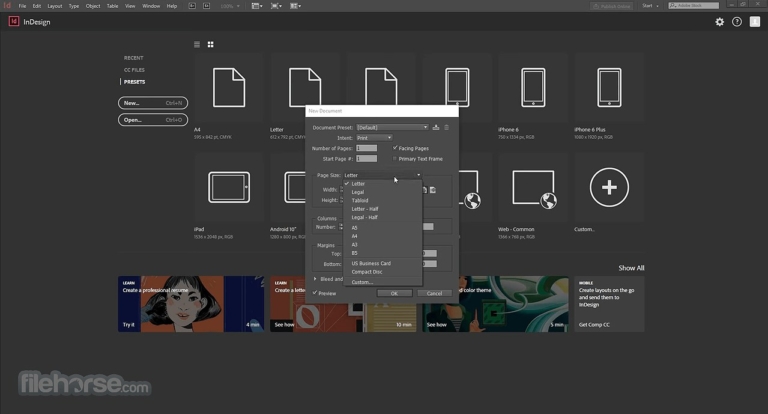
What can Adobe InDesign 2027 do?
What's new
- AI Assistant (beta). Ask in natural language to help find answers and manage routine tasks within documents without leaving the program.
- Flex Layout. Layouts automatically adjust according to content without needing to reposition everything every time content changes.
- Generative Fill. Transform SVG shapes and text into textured images with custom effects.
- Convert PDF to InDesign Document. Convert PDF files back into InDesign documents for editing and republishing.
- Automatic Alt Text. Generate AI image descriptions right when placing images into the document.
- Generative Expand. Expand images with AI to fit borders and bleed areas without losing proportions.
Multi-page layout design.
- Ready-made templates. Download high-quality templates from Adobe Stock directly within the program, fully editable from business cards to brochures.
- Adjust Layout. Adjust page sizes, margins, or bleed areas and layout elements will adjust accordingly.
- Parent Pages. Define template pages once and reuse them across all pages. Arrange, duplicate, and combine pages and spreads in just a few steps via the Pages panel.
- Section Numbering. Add page and chapter numbers to large documents, format them as needed, and update them automatically when the document changes.
- Measure Tool. Measure distances and angles between two points to achieve precise layout proportions.
- Creative Cloud Libraries. Directly copy and paste artwork and text from Illustrator and Photoshop. Import PDF graphics, videos, and text files, and store assets for reuse.
Typography
- Auto Style. Select text and choose a preset; the program will automatically format headings, subheadings, and paragraphs.
- Math Expressions. Create and format mathematical and scientific equations with accessible MathML support.
- Adobe Fonts. Choose from over 20,000 professional-grade fonts. Search, filter, and organize them directly within the program, with support for OpenType and Variable fonts.
- Kerning and Tracking. Fine-tune character spacing, and use Character Styles and Paragraph Styles to format large amounts of fonts and text all at once.
- Variable Fonts. Adjust font weight, width, and slant directly from the Character panel until it fits your work.
- Searchable Font Family. Favorite frequently used fonts for easy access, and search fonts by category, date added, and other criteria from the menu in the Character panel.
Share and Publish
- Cloud Documents. Share, save, and manage files wherever InDesign is installed. Autosave keeps older versions for easy recovery.
- Publish Online. Publish documents as web versions complete with buttons, animations, and searchable text, and track reader statistics via Google Analytics.
- Share for Review. Send work links to collaborators for comments, read feedback within the program, and update the same link instantly.
- Preflight. Check for missing files or fonts, low-resolution images, overset text, and other issues before printing.
- Adobe Express. Export files from InDesign to Adobe Express, lock layout elements, and share them with the team for quick editing and versioning.
- Data Merge. Merge data files such as CSV or TXT with documents to generate bulk letters, envelopes, or name tags all at once.
What's new
Version 22.0
- AI Assistant (beta). Type what you need in plain language to help fix content, layouts, and objects in multi-step documents.
- Check Document. Check missing alt text, table summaries, inconsistent terminology, and grammar issues all in a single panel.
- Rewrite. Refine phrasing with grammar suggestions and new copy variations.
- Redesigned Font Browser. Search and preview fonts faster.
- Flex Layout. Text frames automatically resize based on content, and child elements are locked to prevent unintended movement.
- Native Windows ARM. Run at full performance on ARM64 processors without emulation.
- Export from Pages Panel. Export pages, spreads, or entire documents as PDF, JPEG, PNG, EPS, or fixed-layout EPUB directly from the right-click menu.
- Math Expressions. Set None as the default font style for a cleaner-looking equation.
- Scripts Panel. Search for scripts by name and run them instantly without browsing through individual folders.
- Alt Text. Get alerts when existing alt text becomes outdated after cropping, and let AI generate image descriptions upon placement.
- Accessible ARIA Labels and Glossary. Set ARIA labels via Object Styles, support ARIA roles and labels for cross-references and hyperlinks, and make glossaries easy for everyone to read.
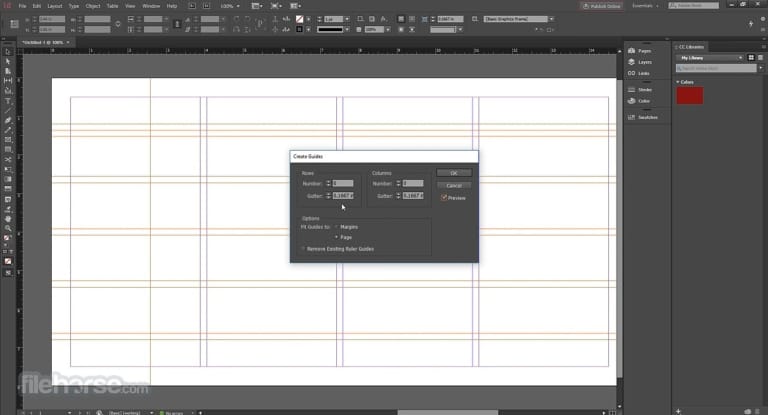
file information
- Operating System: Windows 11 / 10 (64-bit)
- License: Shareware
- Developer: Adobe Inc.
- Language: Multilingual
- Size: 1.46 GB
- File type : *.rar
- Password: mawto
- Installation method: Yes
- Updated on: 12/11/2026
- Need to read: Download Guide